3. Tutorial
In this chapter, several tutrials can be found which show the usage of
pymilestone. The milestone can be customized with different properties,
see Milestoneplan for more details.
3.1. Basic Usage
In this tutorial, the basic usage of pymilestone is shown. For this,
a simple milestoneplan is created.
3.1.1. Pre-Configuration
First, the required modules must be imported:
from datetime import datetime
from pymilestone import Milestoneplan, Task, Milestone, Caption, Subcaption, Category
In the next step, a variable date_today is defined with the current date.
This allows for ongoing task to be automatically updated. In this tutorial,
date_today is set to a fixed date (so that the image will be the same, when
you run the tutorial):
date_today = datetime(2022, 2, 10)
You can use datetime.now(), so set this variable to the current date.
In the next step, a Milestoneplan object is created. The constructor defines
its appereance.
my_milestone = Milestoneplan(
    include_weekend=False, today=date_today,
    key_top_caption="month", key_sub_caption="week"
)
For now, we will ignore the parameters. For more details see
Milestoneplan and
the tutorial Customization below.
3.1.2. Add Categories
In the next step, the categories must be added. Categories must be configured by the user. For example, one might use one category for the plan and another category for the current state of the work:
my_milestone.add_category(
    Category(key="plan", displayname="Plan",
             color=(153/255, 204/255, 255/255))
)

my_milestone.add_category(
    Category(key="actual", displayname="Current",
             color=(146/255, 208/255, 80/255))
)
Each category will be shown in a separate line with the predefined color.
The value for key can be chosen arbitrarily, but must be unique.
The displayname can also be chosen arbitrarily, it will be shown in the
legend. The color for each category must also be set by the user.
3.1.3. Add Tasks
Now, the milestoneplan is configured and tasks can be added. The following elements can now be added to the milestoneplan:
Caption: Caption of a group of tasks.
Subcaption: Caption for a sub-group of tasks.
Task: Task, which has a date range, in which it is performed.
Milestone: Milestone, which has a date, at which it should be finished.
All elements can be added with the method add_element.
Adding Captions and Subcaption is simple, as they require only a description
(key text):
my_milestone.add_element(Caption(text="Pre-Investigation"))
my_milestone.add_element(Subcaption(text="Literature research"))
Tasks can also be added easily, but they require additional details of the
time range, in which they should be / are performed. For this, the
add_date_range of the Task object can be used. Since it returns
itself, the add_date_range calls can be chained:
my_milestone.add_element(
    Task(text="Perform Literature Research")
        .add_date_range(key="plan",
                        start_date=datetime(2022, 1, 1),
                        end_date=datetime(2022, 1, 30))
        .add_date_range(key="actual",
                        start_date=datetime(2022, 1, 4),
                        end_date=datetime(2022, 2, 7))
)
So first, the task was created. Then, the details for the cateogry
plan are added. And finally, the details for the category
actual are added.
A milestone can be added in a similar way. Since it is due to one specific
date, the add_date method must be used:
my_milestone.add_element(
    Milestone(text="Present Results")
        .add_date(key="plan",
                  date=datetime(2022, 1, 31))
        .add_date(key="actual",
                  date=datetime(2022, 2, 8))
)
3.1.4. Render Milestoneplan
Until now, only the details were added. Now, the milestoneplan must be plotted. Usually, it will also be saved into a file:
fig = my_milestone.create_fig()

f_path_out = r"N:\my_milestoneplan.png"
fig.savefig(f_path_out, dpi=600)
3.1.5. Resulting Milestoneplan
The following code block summarises the above tutorial:
import os
from datetime import datetime

from pymilestone import Milestoneplan, Task, Milestone, Caption, Subcaption, Category

date_today = datetime(2022, 2, 10)

my_milestone = Milestoneplan(
    include_weekend=False, today=date_today,
    key_top_caption="month", key_sub_caption="week"
)

my_milestone.add_category(
    Category(key="plan", displayname="Plan",
             color=(153/255, 204/255, 255/255))
)

my_milestone.add_category(
    Category(key="actual", displayname="Current",
             color=(146/255, 208/255, 80/255))
)

###########################################################################

my_milestone.add_element(Caption(text="Pre-Investigation"))
my_milestone.add_element(Subcaption(text="Literature research"))
my_milestone.add_element(
    Task(text="Perform Literature Research")
        .add_date_range(key="plan",
                        start_date=datetime(2022, 1, 1),
                        end_date=datetime(2022, 1, 30))
        .add_date_range(key="actual",
                        start_date=datetime(2022, 1, 4),
                        end_date=datetime(2022, 2, 7))
)
my_milestone.add_element(
    Milestone(text="Present Results")
        .add_date(key="plan",
                  date=datetime(2022, 1, 31))
        .add_date(key="actual",
                  date=datetime(2022, 2, 8))
)

fig = my_milestone.create_fig()

f_path_out = os.path.join(DIR_PATH_OUT, "1000_my_milestoneplan1.png")
fig.savefig(f_path_out, dpi=600)
This creates the following milestoneplan:
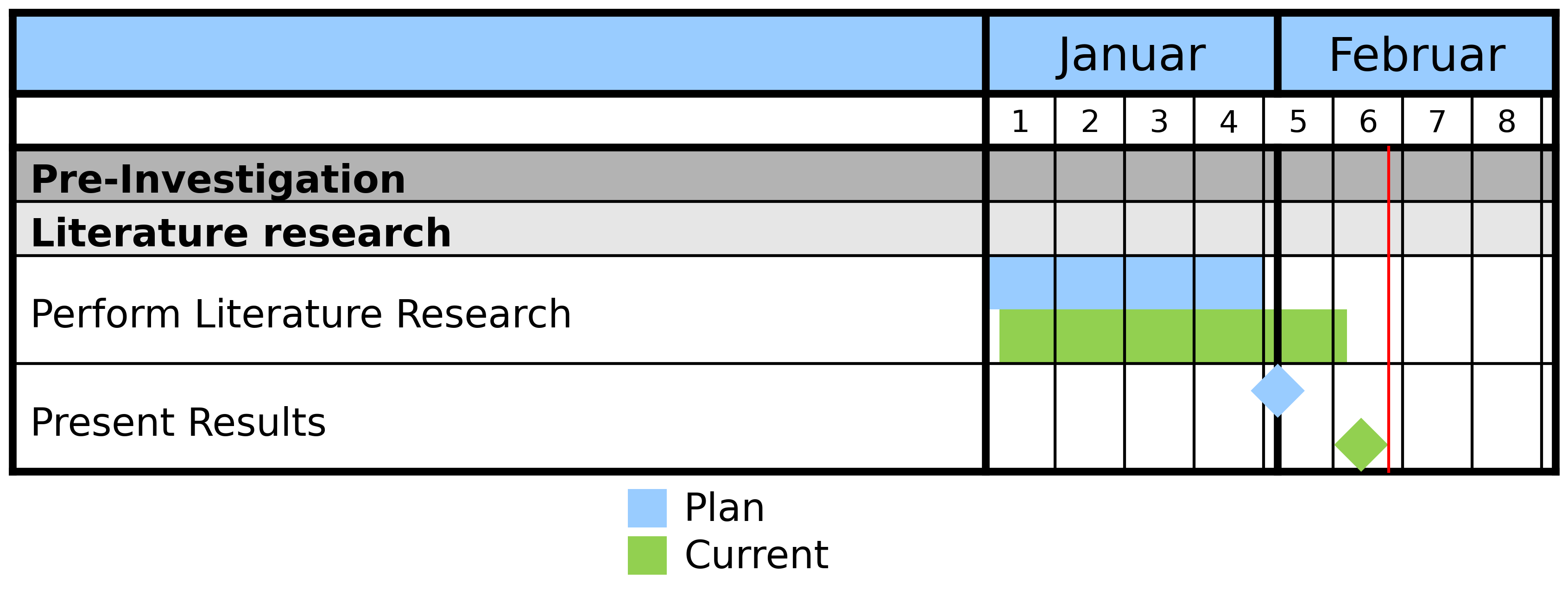
Resulting Milestoneplan.
3.2. Advanced Captions and Tasks
The following example extends the previous one and shows some more modifications. For example, it is common to add more than one subcaption to one caption.
Linebreaks in task can be set manually by entering \n.
Furthermore, the date range of a task can be
split into two periods, simply by calling add_date_range another time.
import os
from datetime import datetime

from pymilestone import Milestoneplan, Task, Milestone, Caption, Subcaption, Category

date_today = datetime(2022, 2, 10)

my_milestone = Milestoneplan(
    include_weekend=False, today=date_today,
    key_top_caption="month", key_sub_caption="week"
)

my_milestone.add_category(
    Category(key="plan", displayname="Plan",
             color=(153/255, 204/255, 255/255))
)

my_milestone.add_category(
    Category(key="actual", displayname="Current",
             color=(146/255, 208/255, 80/255))
)

###########################################################################

my_milestone.add_element(Caption(text="Pre-Investigation"))
my_milestone.add_element(Subcaption(text="Literature research"))
my_milestone.add_element(
    Task(text="Perform Literature Research")
        .add_date_range(key="plan",
                        start_date=datetime(2022, 1, 1),
                        end_date=datetime(2022, 1, 30))
        .add_date_range(key="actual",
                        start_date=datetime(2022, 1, 4),
                        end_date=datetime(2022, 2, 7))
)
my_milestone.add_element(
    Milestone(text="Present Results")
        .add_date(key="plan",
                  date=datetime(2022, 1, 31))
        .add_date(key="actual",
                  date=datetime(2022, 2, 8))
)

###########################################################################

my_milestone.add_element(Caption(text="Main Investigation"))
my_milestone.add_element(Subcaption(text="Calculations"))
my_milestone.add_element(
    Task(text="Prepare Calculations")
        .add_date_range(key="plan",
                        start_date=datetime(2022, 2, 1),
                        end_date=datetime(2022, 2, 7))
        .add_date_range(key="actual",
                        start_date=datetime(2022, 2, 1),
                        end_date=datetime(2022, 2, 7))
)

my_milestone.add_element(
    Task(text="Perform Calculations\nand Evaluate Calculations")
        .add_date_range(key="plan",
                        start_date=datetime(2022, 2, 8),
                        end_date=datetime(2022, 2, 9))
        .add_date_range(key="plan",
                        start_date=datetime(2022, 2, 15),
                        end_date=datetime(2022, 2, 23))
        .add_date_range(key="actual",
                        start_date=datetime(2022, 2, 8),
                        end_date=date_today)
)

my_milestone.add_element(Subcaption(text="Publication"))
my_milestone.add_element(
    Task(text="Write Paper")
        .add_date_range(key="plan",
                        start_date=datetime(2022, 2, 28),
                        end_date=datetime(2022, 3, 10))
)
my_milestone.add_element(
    Milestone(text="Submit Paper")
        .add_date(key="plan",
                  date=datetime(2022, 3, 17))

)

###########################################################################

fig = my_milestone.create_fig()

f_path_out = os.path.join(DIR_PATH_OUT, "2000_my_milestoneplan2.png")
fig.savefig(f_path_out, dpi=600)

Resulting Milestoneplan.
3.3. Customization
This example shows some customization options. The following customizations are used:
Different locale: The language (e.g. of the months) can be changed with the
custom_localeparameter.The top caption and subcaptions are changed (years and months respectively).
Font sizes are changed:
Size of the top caption (default 12, here 14).
Size of the tob subcaption (default 8, here 10).
Size of the captions and tasks (default 10, here 12)
Size of the legend (default 10, here 12)
Width of the column containing the tasks. Here it is set to 2.5, default 3.5. The optimal value for your milestoneplan must be found by trial and error.
Changed background colors.
Start and end date are set manually.
Width of each single day is changed. This hence defined the width of each month.
import os
from datetime import datetime

from pymilestone import Milestoneplan, Task, Milestone, Caption, Subcaption, Category

my_milestone = Milestoneplan(
    include_weekend=False, today=None, custom_locale="de_DE",
    key_top_caption="year", key_sub_caption="month",
    fs_top_caption=14, fs_top_subcaption=10,
    fs_task=12, fs_legend=12, width_col_task=2.5,
    c_background_top_caption=((248/255), (203/255), (173/255)),
    c_background_top_subcaption=((217/255), (225/255), (242/255)),
    c_background_task_caption=((255/255), (217/255), (102/255)),
    c_background_task_subcaption=((255/255), (242/255), (204/255)),
    start_date=datetime(2021, 12, 1),
    end_date=datetime(2023, 1, 31),
    width_day=0.3
)

my_milestone.add_category(
    Category(key="plan", displayname="Plan",
             color=(153/255, 204/255, 255/255))
)

my_milestone.add_category(
    Category(key="actual", displayname="Current",
             color=(146/255, 208/255, 80/255))
)

###########################################################################

my_milestone.add_element(Caption(text="Example Caption"))
my_milestone.add_element(Subcaption(text="Example Subcaption"))
my_milestone.add_element(
    Task(text="Task 1")
        .add_date_range(key="plan",
                        start_date=datetime(2022, 1, 1),
                        end_date=datetime(2022, 3, 31))
        .add_date_range(key="actual",
                        start_date=datetime(2022, 1, 1),
                        end_date=datetime(2022, 3, 31))
)

my_milestone.add_element(
    Task(text="Task 2")
        .add_date_range(key="plan",
                        start_date=datetime(2022, 4, 1),
                        end_date=datetime(2022, 6, 30))
        .add_date_range(key="actual",
                        start_date=datetime(2022, 4, 1),
                        end_date=datetime(2022, 7, 16))
)

my_milestone.add_element(
    Task(text="Task 3")
        .add_date_range(key="plan",
                        start_date=datetime(2022, 7, 1),
                        end_date=datetime(2022, 9, 30))
        .add_date_range(key="actual",
                        start_date=datetime(2022, 7, 17),
                        end_date=datetime(2022, 10, 16))
)

my_milestone.add_element(
    Task(text="Task 4")
        .add_date_range(key="plan",
                        start_date=datetime(2022, 7, 18),
                        end_date=datetime(2022, 12, 31))
        .add_date_range(key="actual",
                        start_date=datetime(2022, 10, 17),
                        end_date=datetime(2022, 12, 15))
)

###########################################################################

fig = my_milestone.create_fig()

f_path_out = os.path.join(DIR_PATH_OUT, "3000_my_milestoneplan3.png")
fig.savefig(f_path_out, dpi=600)
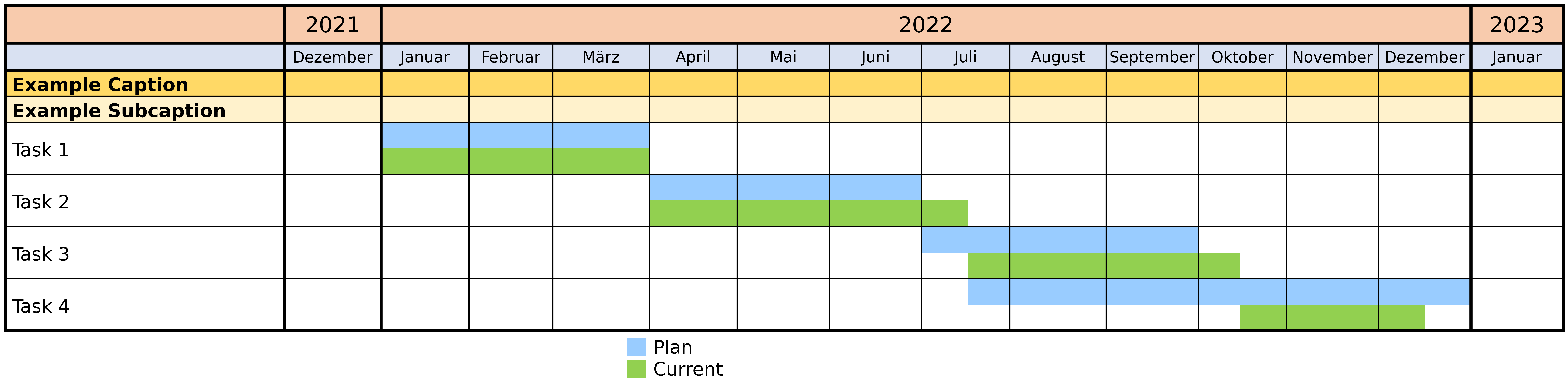
Resulting Milestoneplan.